
Note: Your Access Level may restrict the use of some features.
To add Chemicals on the Desktop, see Adding Chemicals.
To add Machinery & Equipment, Structures or Tools, see Adding Inventory (App).
- From the main menu
 , tap Inventory > Chemicals.
 - Tap + Add Chemical.
- Complete the required fields - Name, Active Constituent, Opening Quantity and Unit of Measurement.
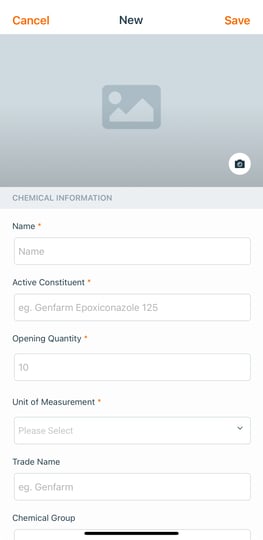
- Complete any optional fields as needed.
Note: the link to the Safety Data Sheet won't be available in Offline Mode or in areas with no connection. Consider including critical information in the Notes and Instructions fields such as First Aid Measures from Section 4 and Spill instructions from Section 6 of the SDS.- Safety Data Sheet (SDS) – Upload a link to either:
- the manufacturer's online SDS, or
- the manufacturer's webpage for that chemical which contains a link to the SDS and Label - recommended.
- Hazard Information - Found in the GHS Classifications within the Safety Data Sheet - Section 2.
Safework Australia provides a Factsheet and Poster which may be useful when identifying the classification of chemicals:
Understanding Safety Data Sheets for Hazardous Chemicals - Factsheet
Classification and Labelling for Workplace Hazardous Chemicals - Poster
- Safety Data Sheet (SDS) – Upload a link to either:
- Tap Save.